Lab 6: The Internet of Things and Serial Peripheral Interface
Introduction
This is the third Lab in E155 working with microcontrollers. The goal of this lab is to implement an internet-accessible device to control an onboard LED and measure ambient temperature. It uses an ESP8266 with the provided web server code to host the webpage and use the onboard MCU GPIO and SPI peripherals to toggle an LED and to read temperature from a DS1722 temperature sensor. Users can turn the LED ON and OFF and view the current temperature from the webpage.
Design and Testing Methodology
The primary challenge of this lab is to interface with periferals with different protocols, such as USART and SPI. I wrote custom drivers for my MCU to communicate with the wifi and temperature sensor chips, configured for their specific parameters.
Segger Testing
Before ever flashing the MCU or connecting to the temperature or wifi sensors, I tested my code in Segger Embedded Studio, loaded with drivers and packages for my STM32L432KC MCU. This allowed me to test that my code was compiling and had no syntax errors.
Oscilloscope Logic Analyzer
In order to debug my SPI connection, I used the logic analyzer function on an oscilloscope. Before this, I was always getting a temperature reading of zero, as I was never getting anything back from the temperature sensor. This helped me realize I was not triggering the chip select on my set precision, along with a few other issues.
With the logic analyzer’s help, I was able to confirm that my SPI transactions were working as intended.
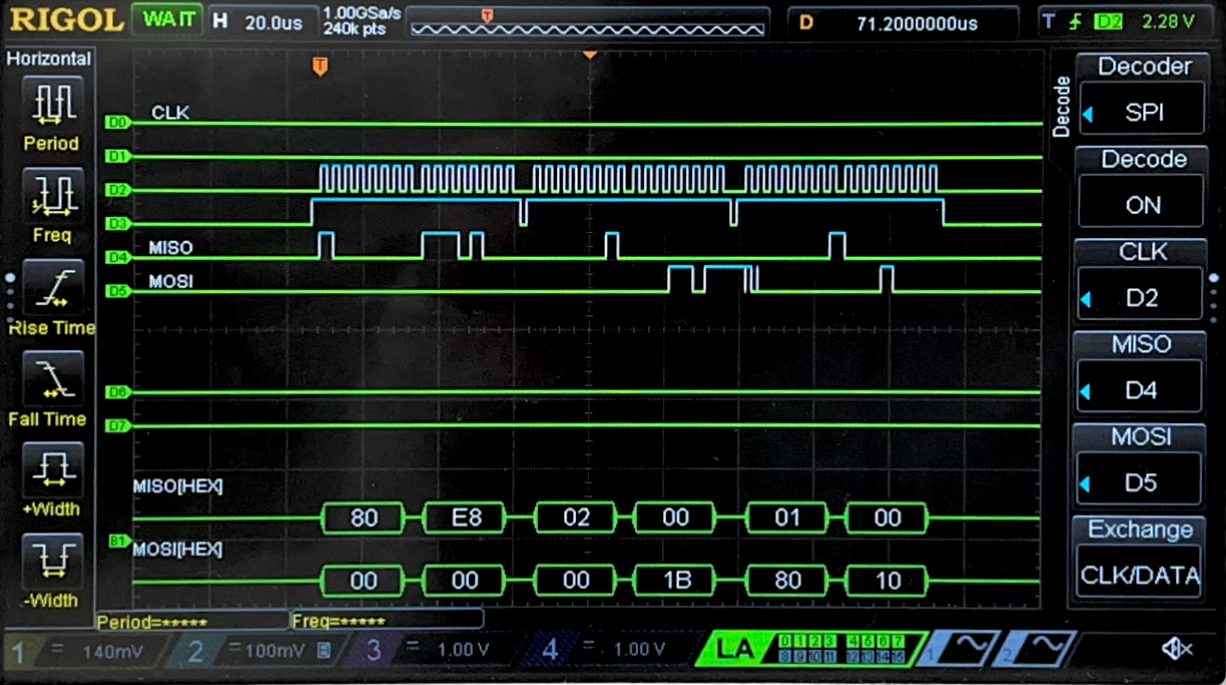
Here we first see the precision being set to 12 bits, in the first two packets on information shows on MOSI at the bottom of the screen. The first packet 0x80 is the address, and 0xE8 is the precision. This is followed by a readTemp() call, which provides the MSB packet followed by the LSB packet. The address for MSB and LSB and 0x02 and 0x01, respectively, and this returned the current temperature.
Technical Documentation:
The code for my project can be found on my github page. Lab6 Github Repository
Schematic
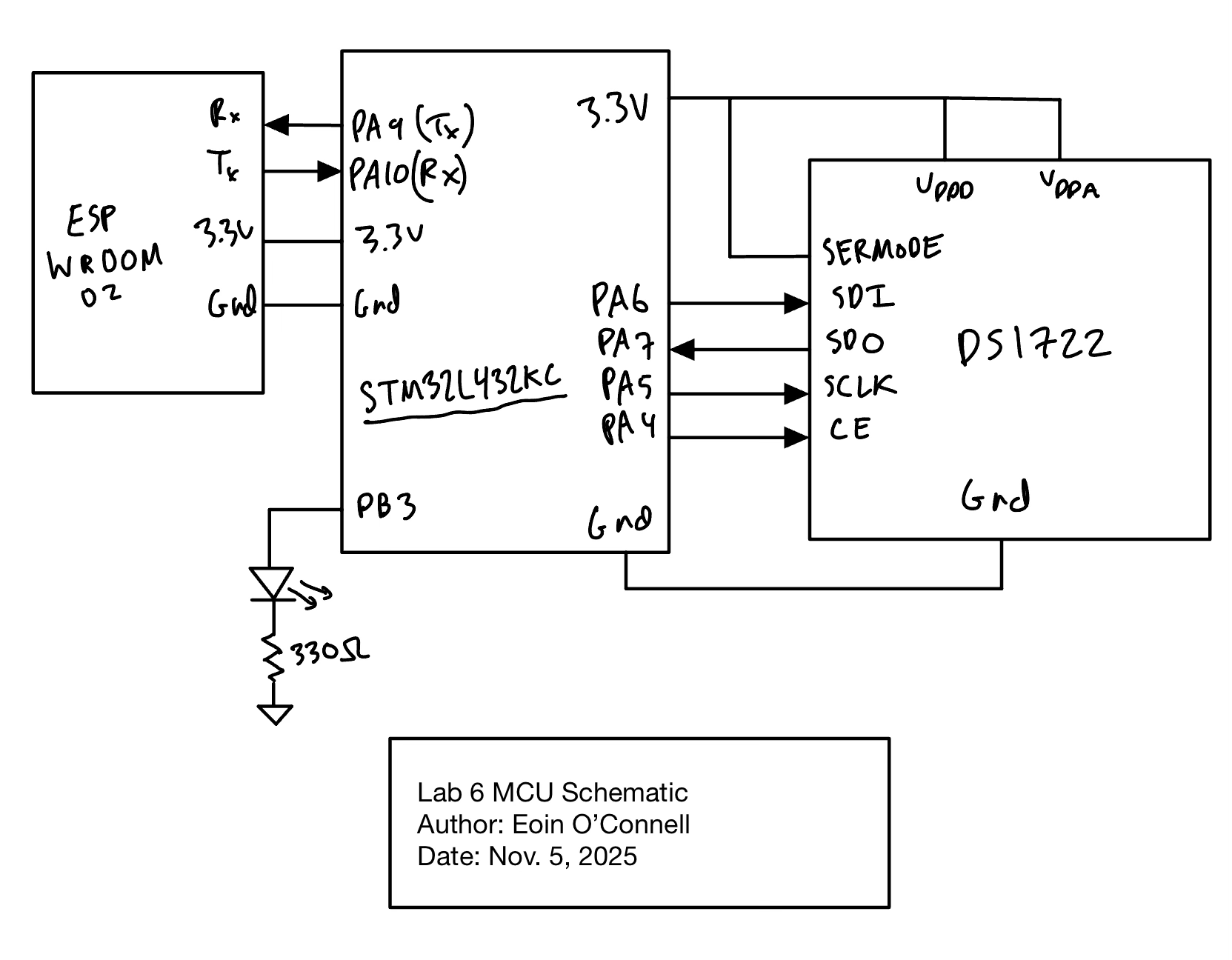
Figure 2 shows the physical layout of the design.
Results and Discussion
I accomplished all of the perscribed tasks: The microcontroller correctly measures communicates via SPI to the temperature sensor, and publishes the current value on the website.
From the website, you can update the precision, and change the LED status.
Conclusion
I spent around 13 hours on this lab. A few hours was writting the differnet drivers and doing inital work before testing. Next came getting the website to run on the MCU. I ran into a lot of html issues, and MCU issues on this, so it took a few hours to get it to work.
Finally, the main amount of time was debugging the temperature sensor itself. I had to learn how to use the logic analyzer, and spent a long time getting it to work. Xavier was a huge help in debugging this.
I found this to be the second hardest lab so far, only after lab 3. I am much more comfortable using test benches to debug before doing anything in the real world, but this lab really required benchtop debugging with the logic analyzer. I am very happy to have worked on these skills.
AI Prototype Summary
LLM Prompt 1:
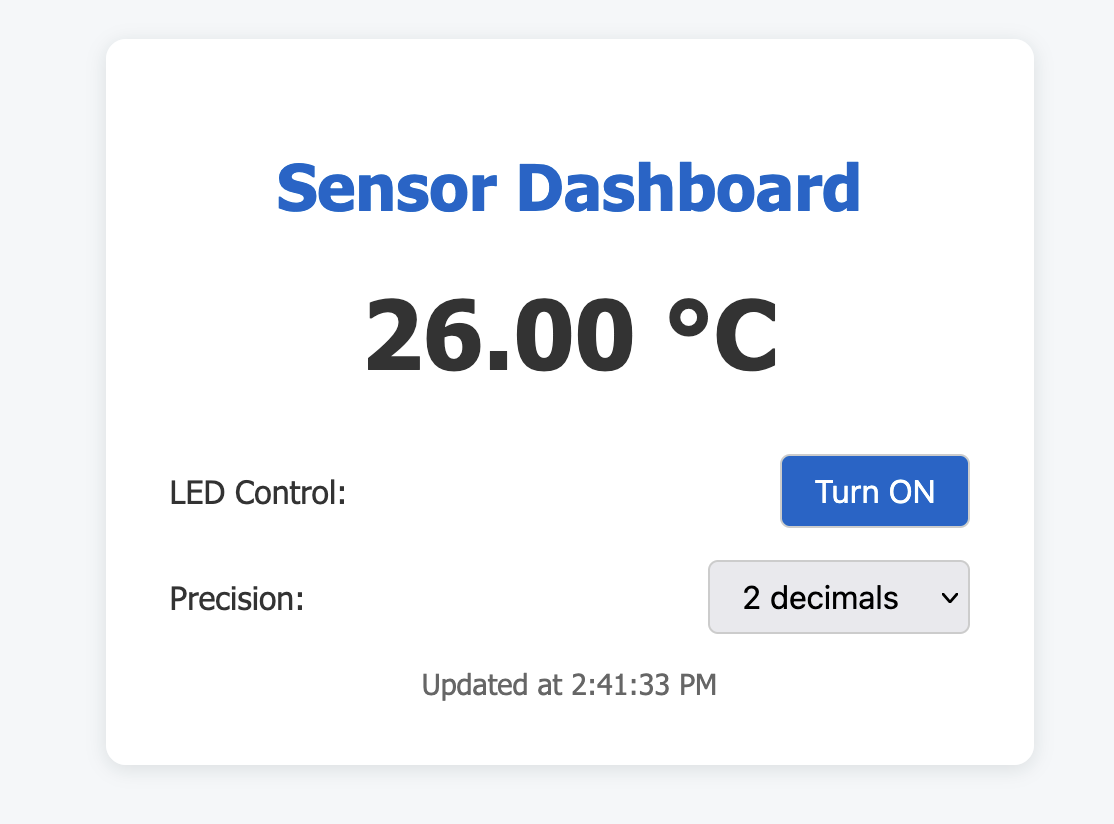
I’m making a web portal to interface with a temperature sensor. Create a HTML page that looks good and is intuitive to show the temperature, control an LED, and change the precision of the readout.
Here, the AI did a really good job, it implemented the following website, and all the buttons worked smoothly and as expected. This highlighted the strength that AI models have in front end development. My website is very barebones, with the default html buttons and no style at all. With just a few seconds, I can use AI to make my websites much better, and this is a very low risk use. Generally, as long as the website works and looks good, it is hard for the AI to have introduced any major issues through hallucination.
LLM Prompt 2:
Write me a C function to carry out a SPI transaction to retrieve a temperature reading from a DS1722 sensor. Make use of CMSIS libraries for the STM32L432KC.
For writing this library, the AI needed some more guidance. It referenced some fields that are not being recongized and will not compile. Potentially through including more #include statements this could work.